


Cloaked: Protect your privacy
4.53.15K Reviews
App Specs
- Version
- 2.89.8
- Updated On
- License
- Free
- Downloads
- 100,000+
- Developer
- cloaked
- Categories
- Productivity
- Platform
- Android
Screenshots
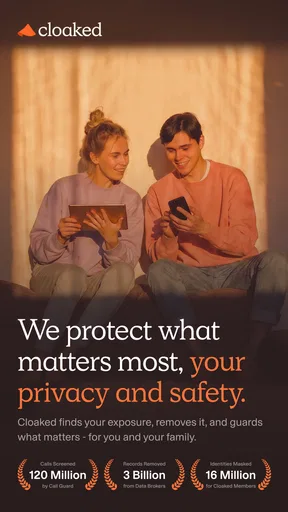
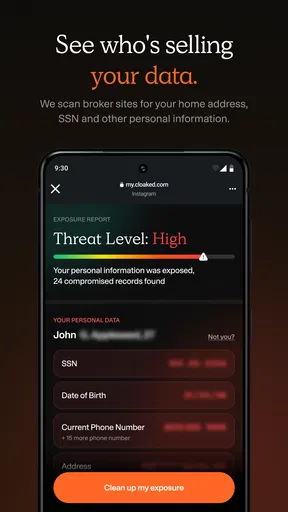
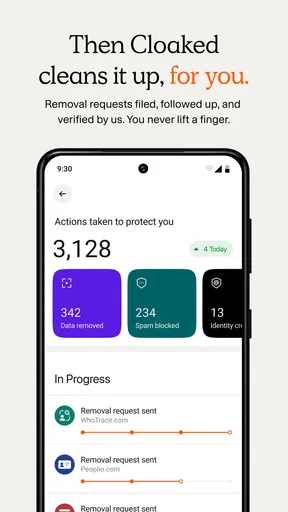
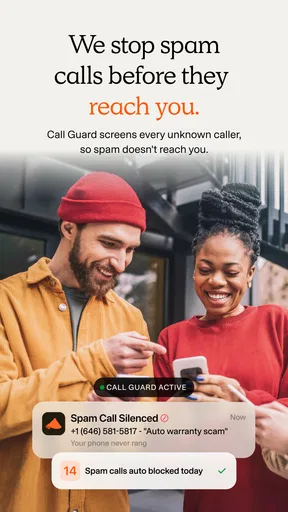
 Analysis by AppCompare
In today’s digital world, where everything is just a tap away, privacy has become a hot topic. With so many apps and services demanding access to our personal data, it’s no wonder that people are looking for ways to keep their information safe. Enter Cloaked: Protect your privacy, the app that's promising to shield your data while you enjoy the benefits of modern technology. Let me take you through what I found after giving it a spin.
My main takeaway is that privacy tools are most useful when they fit into routines I already have. Cloaked is a productivity app from cloaked, built around reducing how often I have to hand out my primary contact and payment details. That makes it relevant not only to people who follow online security closely, but also to anyone who is tired of promotional messages, unwanted calls, or losing track of which service has which personal detail.
The app is free to download, with in-app purchases ranging from $4.49 to $143.99 per item. That makes it easy to try, but I would think about my likely use before paying for anything: a person who only needs occasional separation between a real inbox and online sign-ups may have different needs from someone who wants to use privacy tools regularly. Cloaked is rated for Everyone, and its current version is 2.78.1. It was released on September 30, 2023, and has a minimum OS requirement of 10.
Its audience is not limited to people who want to hide from everyone online. I can see the appeal for someone selling an item through a marketplace, registering for a one-off service, or trying a new retailer without immediately sharing a main email address or phone number. The practical benefit is having more control over which contact details go to which relationship. The trade-off is that another layer of separation asks me to remember where I used it and to keep access to the app itself in good order.
Getting Started with Cloaked
First things first, downloading and setting up Cloaked is a breeze. It’s available on both Android and iOS, so you can find it in your respective app store. Once installed, you’re prompted to create an account or log in if you already have one. The interface is clean and intuitive, which is always a nice surprise with privacy apps that tend to be a bit clunky.
After logging in, you’re greeted with a dashboard that gives you a quick overview of your privacy settings and what the app is doing to protect you. It’s a nice touch, especially if you’re someone who likes to keep tabs on things.
For a first session, I would avoid trying to change every privacy habit at once. It is easier to start with a low-stakes registration, such as a newsletter or a store account I may not use often, and decide whether a separate contact detail makes the experience more manageable. That small test also helps me notice where a masked address or number needs to be entered, and whether the messages I actually want still reach me.
Worth Reading Before You Choose

EA SPORTS FC Mobile 26 Is a Bigger Football Game, but It Takes Time

Flipboard Shows What News Apps Must Do Beyond the Feed

Switching to Android Auto Means Rethinking Your Driving Routine

Google Calendar Makes a Crowded Week Easier to Manage

Ludo King Makes the Most of the Minutes Between Plans

Baby Panda World Brings Quick Play to Modern Phones, but Its Game Library Feels Busy
That kind of trial matters because privacy is not simply a switch I turn on once. If I use a separate detail for a service, I need to keep the connection between that detail and the service understandable later. I would label or otherwise keep track of why I created it, especially for accounts tied to receipts, shipping updates, or password recovery. A detail that protects my main inbox can become a nuisance if I can no longer tell which account it belongs to.
Features that Stand Out
Now, what really sets Cloaked apart are its features. The app offers a variety of tools designed to keep your information under wraps. Here are a few highlights:
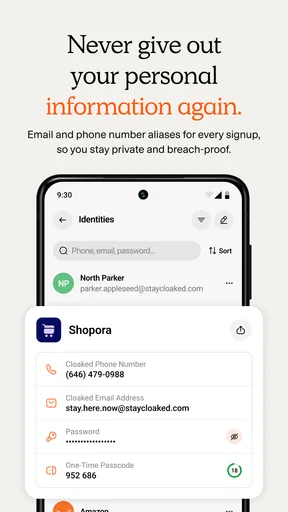
- Masked Emails: This feature lets you create temporary email addresses that forward messages to your real account. It’s perfect for when you’re signing up for something new and aren’t quite sure if you trust them with your primary email.
- Virtual Phone Numbers: Similar to masked emails, Cloaked allows you to generate temporary phone numbers. This is a lifesaver if you’re wary of giving out your real number online.
- Secure Payment Options: With the app, you can create virtual credit cards for online purchases, adding an extra layer of security to your transactions.
These tools are most useful when I match them to the kind of information being requested rather than treating every form the same. For a one-time download that asks for an email, a masked address can help keep the main inbox from becoming a catch-all. For a purchase, separating payment details can help me draw a clearer boundary between that transaction and my usual card information. A phone number is more consequential: I would use a separate one only when I understand how I will receive any follow-up that matters.
There is a useful trade-off here. Using a distinct identity for every unfamiliar service can make it easier to isolate unwanted contact, but it can also create a small record-keeping task. If I later need a receipt, delivery notice, or account reset, I must know which Cloaked detail I used and be able to reach the associated messages. I would not use a masked detail casually for an account that is central to my daily life unless I am comfortable managing that extra step.
Using these features is straightforward, and the app guides you through the process with helpful tips and tutorials. I found this particularly useful because, let’s face it, some of these privacy tools can be a bit intimidating at first.
A realistic example is signing up for a local event while waiting for a bus. I may want the confirmation email, but I may not want the organizer’s future announcements mixed into my main inbox. A masked address gives me a way to keep those messages separate while still checking them through the forwarding arrangement described above. The point is not to make the sign-up anonymous; it is to limit how widely I expose my everyday contact details and to make the source of later messages easier to identify.
Everyday Use and Performance
In terms of performance, Cloaked runs smoothly without any noticeable lag. It’s designed to work in the background, so you won’t find it hogging your phone’s resources. The battery consumption is minimal, which is a major plus for those of us who are always on the go and don’t want to be tethered to a charger all day.
One of the things I appreciated most was the app’s ability to integrate seamlessly with other apps. Whether you’re shopping online or simply browsing, Cloaked works quietly to keep your data safe without interrupting your experience. It’s like having your very own digital bodyguard.
On a phone, the most important test is often not a dramatic security scenario but a rushed moment: filling in a form between errands, checking a purchase confirmation, or responding to a message while away from a computer. A privacy setup that requires too much thought is easy to abandon in those situations. I would decide in advance which kinds of sign-ups deserve a masked detail, rather than making that choice under time pressure every time a form appears.
Connectivity shapes that convenience. Email forwarding and account access depend on being able to get online and receive the relevant messages through the usual connected services. In a weak-signal area, I would not assume a new address or number can be created or checked instantly; I would prepare important details before heading somewhere I expect poor reception. For a time-sensitive purchase or account verification, keeping the confirmation accessible and checking that messages arrive is more sensible than assuming any privacy app removes network delays.
If a message does not appear when expected, I would first check whether the underlying service has sent it and whether my phone can reach the internet, then confirm that I used the intended masked contact detail. This is a useful troubleshooting habit because a delay can come from several places: the sender, the connection, or the way the account was set up. The same logic applies if I change devices or reinstall an app: before relying on a protected contact method for an important account, I would make sure I can still reach the account and its recovery messages.
For data-conscious use, I would keep the app for situations where it changes a real decision, rather than creating extra identities just because I can. Separating a casual sign-up from a long-term account is a sensible boundary; obscuring details that a trusted service needs for essential support may cause more friction than it saves. I would also avoid treating masked contact details or virtual payment options as a substitute for checking a site before buying. They can reduce exposure, but they do not make a questionable seller trustworthy or guarantee that a transaction will go smoothly.
The usual alternatives are simpler in one respect: I can use a secondary email account, decline optional marketing, or rely on the payment tools already offered by a bank. Those approaches may be enough if my main concern is just inbox clutter or limiting promotional mail. Cloaked’s appeal is having email, phone, and payment privacy tools gathered in one place, rather than assembling separate workarounds. The flip side is that someone who wants only one of those protections may find a dedicated email alias or a familiar card provider easier to understand and manage.
Cloaked has an average rating of 3.9 from around 3.7K ratings, alongside about 1.2K written reviews, and has passed 100K installs. I take those figures as context rather than a promise that it will fit every workflow. The key question for me is whether I will actually use separate contact or payment details often enough to justify adding another account and another place to check. If not, simpler habits may serve me better.
Who Benefits Most from a Separate Privacy Layer
I would recommend trying this approach if you regularly sign up for unfamiliar services, sell or buy through online listings, or want to keep shopping and promotional messages away from your main contact details. It is also a reasonable fit for someone who prefers a single privacy-focused app over juggling a secondary inbox, a separate phone arrangement, and a different payment workaround. The value is practical organization as much as protection: having a clearer boundary between a service and the details I use everywhere else.
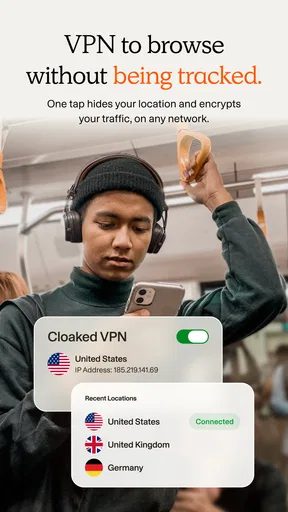
I would be more cautious if I rarely share personal details online, dislike maintaining accounts, or need every part of a transaction to work with as little extra setup as possible. A person who depends on a single email address for critical work, healthcare, or financial access may prefer not to route important communications through a new layer until they have tested the process carefully. Likewise, if my goal is to secure my connection on public Wi-Fi, Cloaked’s described privacy tools are not a substitute for a dedicated network-security solution. Different privacy problems call for different tools.
Before committing to a recurring workflow, I would test one low-risk use case from beginning to end: create or choose a separate detail, use it for a service, wait for the expected message, and check that I can find it again. Then I would consider what happens if I stop using that service. This small habit helps avoid a common downside of compartmentalization: forgetting that an account still depends on an address or number I no longer check.
Final Thoughts
So, is Cloaked: Protect your privacy worth the download? Absolutely. It’s a robust app that delivers on its promise to safeguard your personal information. The features are practical, the interface user-friendly, and the peace of mind it offers is invaluable in today’s privacy-challenged world.
Whether you’re a privacy novice or a seasoned pro, Cloaked has something to offer. It’s an essential tool in the digital age, and I’d highly recommend giving it a try. Remember, protecting your privacy isn’t just about keeping your data safe; it’s about taking control of your digital life. And with Cloaked, you’re definitely on the right track.
My recommendation comes with a boundary: I see it as a useful way to manage what contact and payment details I share, not as a complete answer to every online risk. Its best fit is someone willing to be deliberate about which details go where and to stay connected when they need to manage the resulting messages. If you want that extra separation and are comfortable keeping track of it, Cloaked is worth exploring; if you want a zero-maintenance fix or a tool for a different security need, another option may fit better.
Pros
- Easy to navigate interface.
- Strong encryption features.
- No ads for distraction.
- Minimal battery usage.
- Supports multiple platforms.
Cons
- Limited free version features.
- Occasional connectivity issues.
- No live customer support.
- Complex setup for beginners.
- Requires stable internet.
FAQs for Cloaked: Protect your privacy
What is Cloaked and how does it protect my privacy?
Cloaked is a privacy-focused app designed to safeguard your personal information online. It uses advanced encryption and anonymization techniques to shield your data from trackers and malicious entities. By generating temporary email addresses and phone numbers, Cloaked ensures that your real contact details remain secure, providing an additional layer of protection for online interactions.
Does Cloaked work on both Android and iOS devices?
Yes, Cloaked is available for both Android and iOS platforms. It is designed to function seamlessly across different devices, ensuring that users on either platform can benefit from its robust privacy features. Simply download it from Google Play Store or Apple App Store to get started with protecting your personal information.
Is there a subscription fee for using Cloaked?
Cloaked offers both free and premium subscription options. The free version provides basic privacy protection features, while the premium version unlocks advanced features such as unlimited temporary emails, enhanced encryption, and priority support. Users can choose the plan that best fits their privacy needs and budget.
How user-friendly is Cloaked for non-technical users?
Cloaked is designed with a user-friendly interface, making it accessible even to those without technical expertise. The app provides clear instructions and intuitive navigation, allowing users to easily manage their privacy settings. Additionally, the support team is available to assist with any queries, ensuring a smooth user experience.
Can Cloaked protect my privacy across all online activities?
While Cloaked significantly enhances your online privacy, it primarily focuses on securing your personal contact information. It is recommended to use it in conjunction with other security tools like VPNs and antivirus software for comprehensive privacy protection. Cloaked is an excellent addition to your privacy toolkit, but it is not a standalone solution for all online security needs.


